
CorriDraw for Design Teams: Ideate, Critique, and Hand Off Without the Ceremony
How product designers, researchers, and content folks use CorriDraw for the messy middle of the process — brainstorms, crits, wireframe rounds, and lightweight handoffs that don't require a pixel-perfect file.
Amara Okafor
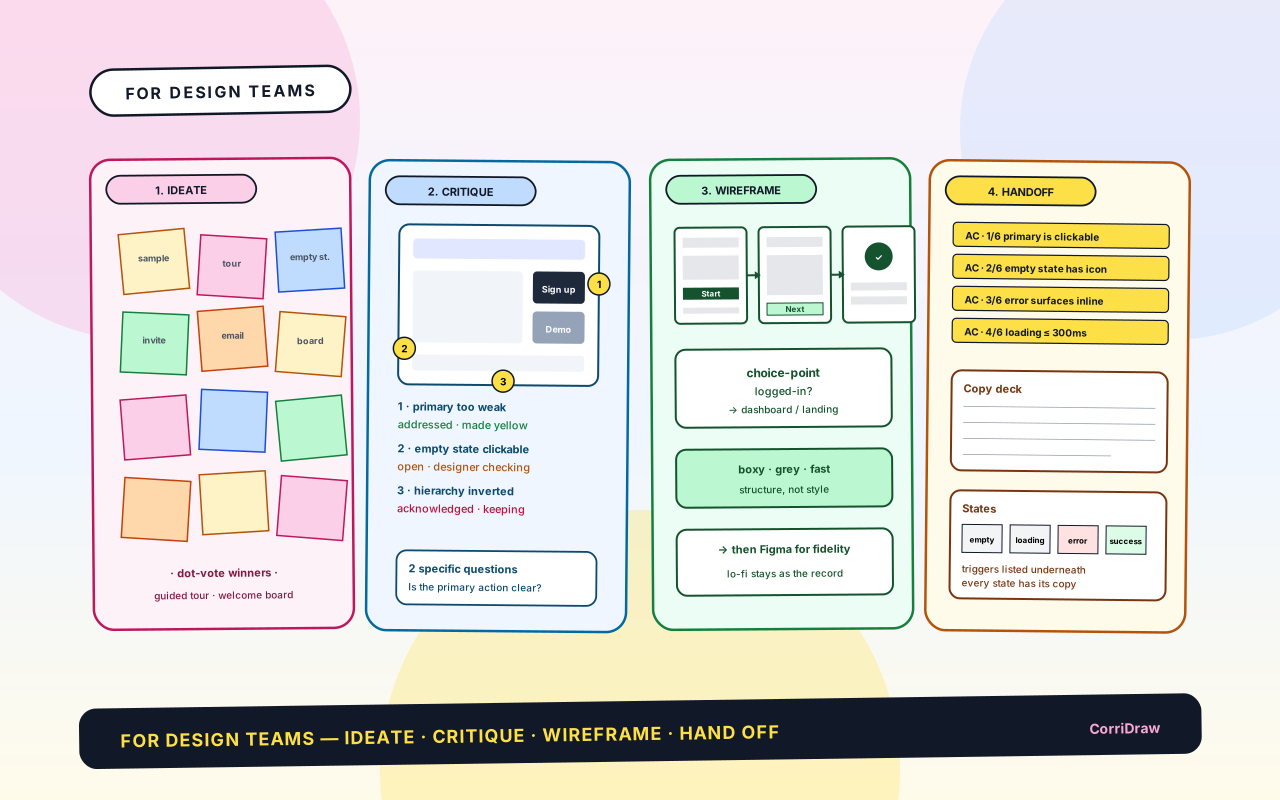
A design team runs four rituals every week — ideate, critique, wireframe, hand off. Most teams run each one in a different tool, and the seams between them are where context goes to die. Here's how to run all four on one canvas, and what each ritual needs to actually work.
The four rituals
- Ideation — generate options for a freshly-scoped problem. Output: sticky-note wall with clusters.
- Critique — pressure-test a design with peers. Output: annotated design with numbered comments.
- Wireframing — commit to a structure engineering can build. Output: lo-fi flow.
- Handoff — make sure the build matches the intent. Output: spec panel beside the flow.
Run them left to right on the same board. The board becomes the diary of the project from "fuzzy idea" to "engineer is unblocked".
1. Ideation
Standard cadence: 10 min silent generation → 5 min clustering → 10 min dot-vote → 30 min discussion on the top clusters. The output is a wall of stickies with three to six clusters circled.
Two disciplines make the wall worth keeping:
- The wall outlives the session. Don't photograph and move on. Leave the wall in the left-most panel so when someone in week 3 asks "why did we go with this?", the dot-voted cluster is still visible — and so are the clusters that lost.
- Run a parking lot. Off-topic-but-good ideas go in a fenced area of the panel. Six months later when you're scoping Q4, the parking lot is your head start.
2. Critique
"What do you think?" isn't a question — it's an invitation to talk past each other. Critique that works follows three rules:
- Pin two specific questions from the designer to the design before the session ("Is the primary action clear?" "Does the empty state feel inviting or intimidating?"). Attendees answer those in writing on the board before anyone speaks.
- Tether every comment to a numbered dot on the artefact. Twenty pieces of feedback aren't overwhelming when each one has a home.
- Mark each comment after the session as addressed, acknowledged but not changing, or open question. Nothing gets quietly dropped, nothing gets blindly accommodated.
3. Lo-fi wireframes first
Figma is great at pixel-perfect and mediocre at before pixel-perfect — the stage where you're deciding list-vs-table, sidebar-vs-no-sidebar, action-top-right-vs-bottom-right. Skip the lo-fi stage and structure gets decided by default.
- Every new screen starts as a boxy lo-fi on the canvas, in a flow of two or three adjacent screens. Grey rectangles, lorem labels, arrows for transitions. No colour, no icons, no spacing.
- The lo-fi is deliberately ugly so the conversation is about structure, not the shade of blue.
- When the flow is signed off, fidelity moves to Figma — but the lo-fi flow stays on the canvas as a record of the structural decision.
4. Handoff
The handoff complaint is always the same: "the engineer built what the Figma said, not what we meant." The fix isn't better Figma — it's a panel beside the flow that contains the things Figma can't.
Four sections, always in this order:
- Acceptance criteria — numbered, one per intended behaviour.
- Redlines — only for the pixel-specific things worth calling out.
- Copy deck — every string in the feature, so the engineer never guesses error text.
- States — empty, loading, error, success, with trigger conditions written underneath.
The engineer reviews the panel before starting; questions are comments on the section, not Slack DMs. When a second engineer picks up the next ticket, the answers live with the question.
Where the design system lives
The design system lives on a separate, long-running board — not the project board. The project board is a diary; the system board is a library.
- Project boards reference components by name ("primary button", "tag pill"). The system board is canonical.
- System board holds: tokens, components, patterns, writing style, accessibility checklist.
- Patterns are the most underused section: empty states, destructive confirmations, progressive disclosure. If your team drifts into inconsistent empty-state copy, you haven't written down the pattern yet.
Try this on your next project
- Pick the next feature about to enter design. Open a fresh board.
- Divide it into four vertical panels: ideate, critique, wireframe, hand off.
- Run the ideation session there — not in a separate tool. Leave the sticky wall standing.
- Move to critique with the wall still visible on the left and the first lo-fi to its right.
- By handoff, the canvas is already the story. The engineer who picks it up will see the reasoning behind the design without asking anyone.
Ready to start collaborating ?
Join thousands of teams using CorriDraw for their visual collaboration needs.