
CorriDraw for Product Teams: Discovery, User Flows, and a Backlog You Can Actually Read
How product managers use CorriDraw to run discovery, map user flows, prioritise with RICE, and keep the backlog visible — the one canvas that replaces six docs and four threads.
Marco Santi
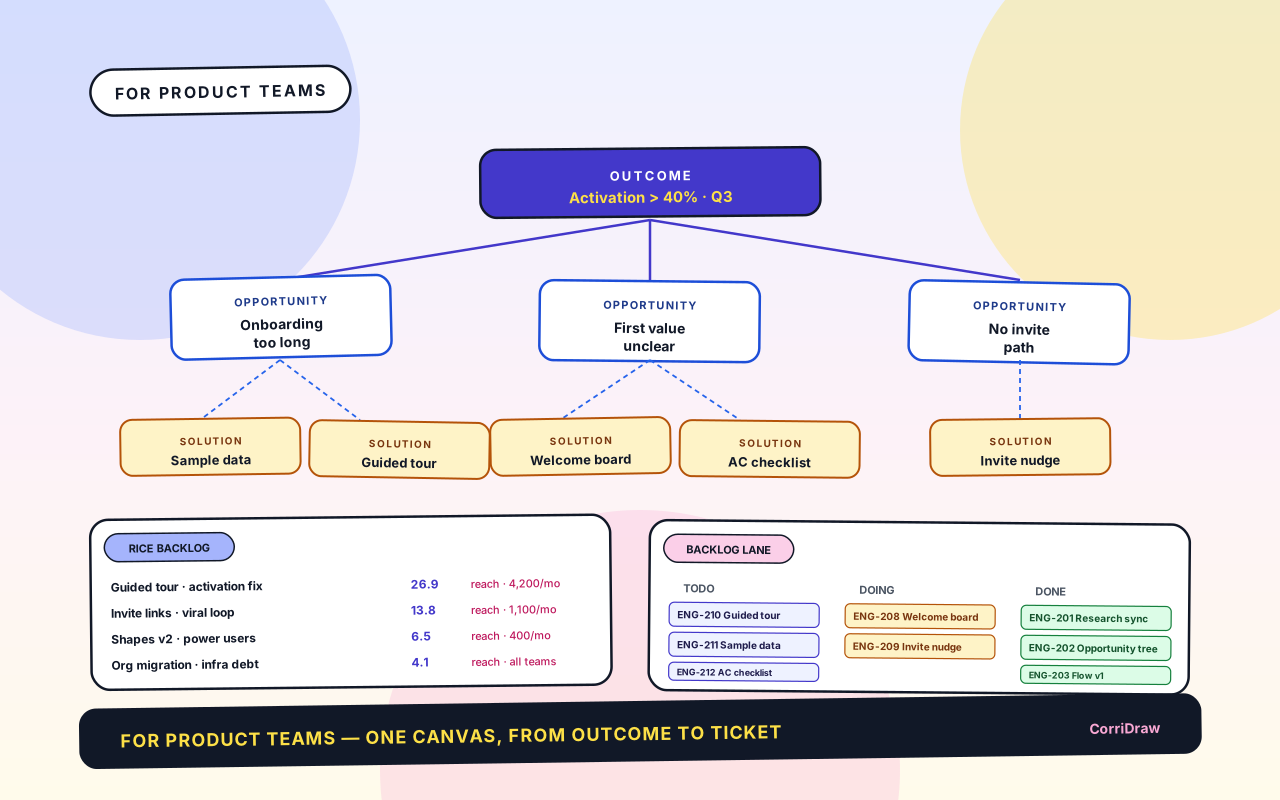
Product work splinters across four tools — research in Docs, trees in Miro, PRDs in Notion, flows in Figma, tickets in Linear. None of them remember why a feature exists. This is the four-artefact setup we use in Corri to keep the thread from outcome to ticket on one canvas.
The cost of splintered context
The problem isn't finding information — it's finding the reason behind it. Why is this feature in the backlog? Some interview six weeks ago. Why does the flow branch here? A PM call three sprints back. Every tool boundary evaporates the rationale, and every new teammate pays the tax of reconstructing it.
Rule on Corri: the canvas is the record. Decisions live on the board. Flows carry their own PRD. Quotes are pinned to the opportunities they changed. Four artefacts do most of the work.
1. Opportunity tree
Outcome at the top. Opportunities (unmet needs) below. Solutions below those. Experiments at the bottom. Read top-down to understand why; read bottom-up to answer what outcome does this serve?
Pin three things under every opportunity node:
- The verbatim user quote that surfaced it
- The metric that quantifies it
- The PM who owns it
When anyone asks "why is this on the roadmap?", they walk to the node and read the evidence. No reconstruction.
2. User flow with the PRD stapled to it
The handoff from "we agreed" to "engineering builds" is the most expensive mile. Each ambiguous decision in the flow costs ~2 days of engineering rework. The cure isn't a longer PRD — it's the PRD sitting on the flow.
Three layers on one canvas:
- Flow — screens, decisions, terminators (see Flowcharts 101).
- Annotations — error states, empty states, button copy, sticky-noted to the node they describe.
- Acceptance criteria — numbered (
US-23,US-24) in the right margin so tickets trace back.
The flow is the PRD. Stop writing a separate document — it goes stale within a sprint. Engineers read the spec in one place.
3. Prioritisation that doesn't lie
Every 2×2 lies in the same way: the axes pretend to be objective. Someone calls auth a "3" for effort, everyone nods, the date slips a month.
Use RICE with one rule: every score must be a reason, not a number.
- Reach isn't "8" — it's "4,200 new signups last month".
- Effort isn't "5 points" — it's "two weeks for one BE engineer, confirmed by Devon".
- Confidence isn't "80%" — it's "beta with 30 users, 24 completed the flow".
Keep the table next to the opportunity tree it scored. When someone argues for bumping a feature, point at the outcome and the conversation resolves in a minute.
4. Backlog tethered to its source
Most backlogs are flat lists. Ours has one extra discipline: every ticket is connected by a line to the opportunity-tree node or flow node it came from (Kanban basics in Kanban Boards 101).
What that line buys you:
- Ticket goes stale → opportunity is off the tree → close the ticket.
- Engineering asks "why are we doing this?" → trace the line to the interview quote.
- CEO asks "what's shipping this quarter?" → filter the board to lines ending at the Q-outcome.
Tickets ship in Linear; a small integration syncs title, status, assignee, estimate. The canvas gives the ticket its story; Linear gives it its sprint.
A quarter on one canvas
- Top-left: outcome + opportunity tree, with quotes and metrics pinned.
- Top-right: RICE table, three or four solutions actually funded.
- Middle: user flows for those solutions, acceptance criteria in the margin.
- Bottom: Kanban lane, every card tethered up to its opportunity.
Reviews collapse into walks of the board. Weekly status: top-to-bottom. Roadmap review: lines ending at the Q-outcome. New hire onboarding: read the board for an hour.
Try this with one opportunity this week
- Open a fresh board. One outcome at the top.
- Add one opportunity. Pin one verbatim user quote and one metric to it.
- Draw the user flow for the solution you're considering.
- Number acceptance criteria down the right margin.
- Tether the first three tickets back to the flow.
You'll notice things you didn't notice when the same material was scattered across four documents.
Ready to start collaborating ?
Join thousands of teams using CorriDraw for their visual collaboration needs.