
C4 Model 101: Architecture at Four Zoom Levels
A beginner's guide to the C4 model — the pragmatic way to document software architecture for a mixed audience. Learn the four zoom levels (Context, Container, Component, Code), the supplementary Deployment and Dynamic diagrams, the four shapes and the rules for labelling arrows, when to use C4 vs UML, and how to write C4 diagrams as code with C4-PlantUML. Walk through a full Internet Banking example at every level.
Palakorn V.
Product Lead
What Is the C4 Model?
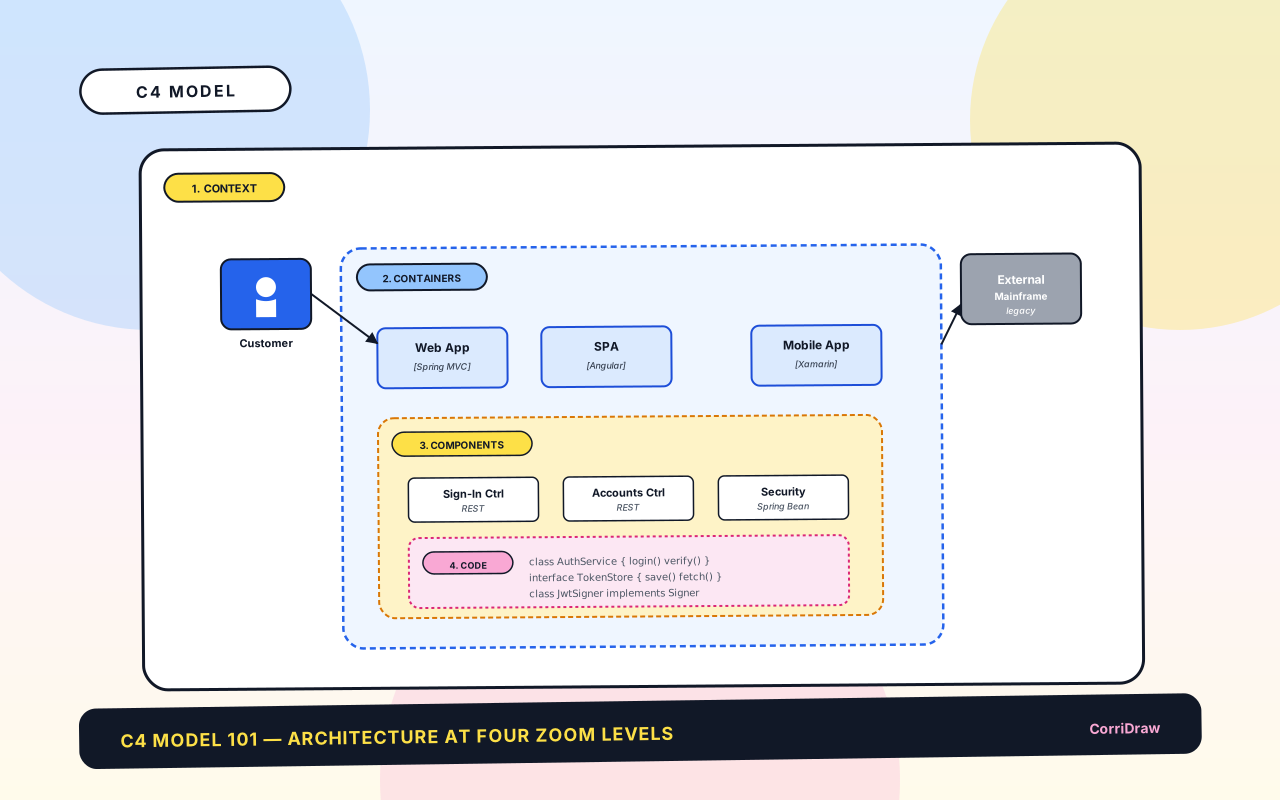
The C4 model is a way to describe software architecture at four zoom levels, each a separate diagram with a specific audience and a specific question it answers. The name is the four Cs, ordered from most-zoomed-out to most-zoomed-in: Context, Container, Component, and Code. Invented by Simon Brown around 2011 as a reaction to UML diagrams that tried to put "everything on one page" and ended up showing nothing clearly, C4 has since become the most practical way to document a system for a mixed audience — engineers, product managers, security reviewers, and new hires all reading the same set of diagrams and each finding what they need.
Here is the highest-zoom-out view of a hypothetical Internet Banking system — one diagram, a handful of shapes, the whole system in context:
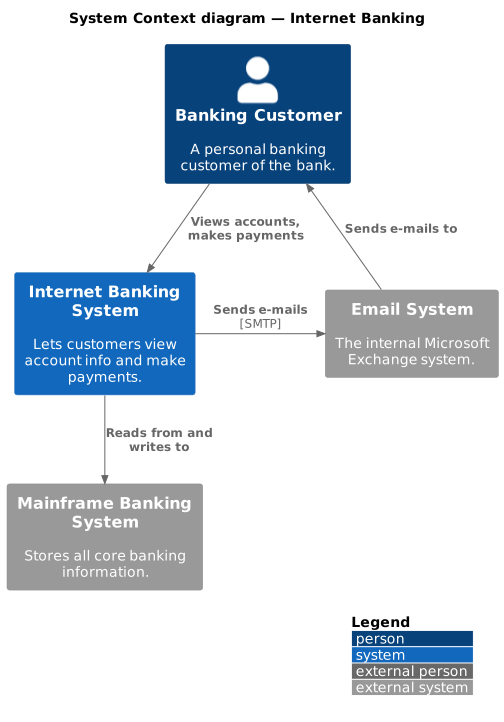
That one picture answers: "What does this system do, and who/what does it talk to?". Anyone — product, sales, security, a new joiner on their first day — can read it in twenty seconds. When they want more, they click into the next level. That progressive disclosure is the whole idea of C4.
This article teaches you to read and draw all four levels: what each one shows, who reads it, what you don't put on it (equally important), and how to keep them in sync as the system evolves. By the end, you'll know when to reach for which diagram, what every shape and arrow means, and how to avoid the "giant picture that helps nobody" trap.
Why C4 Works
Three properties make C4 the default for real-world architecture documentation.
First: separate audiences get separate diagrams. A Context diagram is for stakeholders who don't care how it's built; they care what it does. A Container diagram is for developers who need the high-level architecture. A Component diagram is for the team inside one service. A Code diagram (class / sequence) is for a specific piece of logic. Each reader opens the level that's useful to them and ignores the rest. That's the opposite of a 40-box UML diagram labelled "System Architecture" that's incomprehensible to everyone.
Second: consistent notation, minimal notation. C4 uses four shapes: Person, System, Container, Component. That's it. Arrows for relationships, colours for grouping, labels for describing. Anyone who's read one C4 diagram can read the next one. Compare with UML — 14 diagram types, hundreds of symbols, multiple valid ways to draw the same thing — and you see why most teams bounce off UML and land on C4.
Third: it maps to how software is actually built. Modern systems are made of deployable units (services, apps, databases) that contain logical components (controllers, repositories, workers). C4 names those layers directly — "Container" is the thing you deploy; "Component" is the thing inside it. The diagram vocabulary matches the build artefacts, so the diagrams stay accurate as the system grows.
The Four Levels
Each level zooms in one step. You read them top-down: start at Context, then pick one System inside it and expand to Containers; pick one Container and expand to Components; pick one Component and expand to Code if needed. Each diagram is self-contained — readers don't have to open all four to understand the layer they're looking at.
Level 1 — System Context
The widest view. One system is the focus; everything else on the diagram is an external dependency (other systems) or an external actor (people who use it). You don't draw the internals of your system here; you draw the box, the name, and one short description.
- Shows: the system being documented, the people who use it, the external systems it integrates with.
- Hides: anything inside the system. Technology choices. Database names. Number of services.
- Reader: anyone. Product, sales, security, new hires, auditors.
- Size: 3–10 boxes usually. More than that, and you're already mixing levels.
The context diagram at the top of this article is a standard shape for a Level 1: one main system (blue), one person (grey with the customer icon), two external systems (grey with double borders), labelled arrows showing interactions.
Level 2 — Containers
Zoom into the one system from the context diagram. A container in C4 doesn't mean a Docker container — it means a deployable unit: a web app, a single-page app, a mobile app, a microservice, a database, a message broker. Anything that's its own process or file, that you deploy separately, is a container.
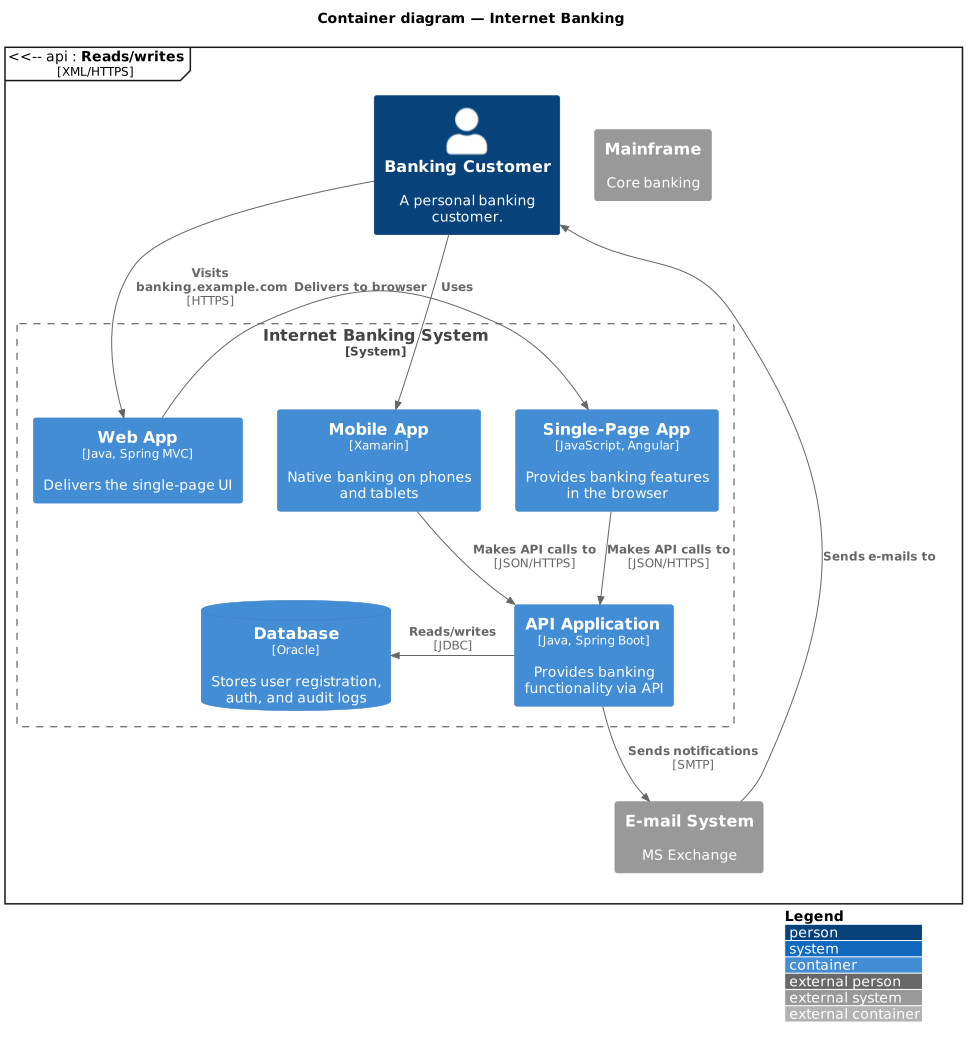
- Shows: every container inside the system, plus the external dependencies still visible from Level 1. Each container has its name, technology choice (e.g. "Java, Spring Boot"), and a one-line responsibility.
- Hides: what's inside each container. Don't draw controllers and repositories here — that's Level 3.
- Reader: developers, technical architects, SREs. The most-looked-at diagram in practice.
- Size: 5–20 containers. More than that usually means the system should be split, or you're mixing containers with components.
Container diagrams tell you the shape of the deployment: three tiers or two, sync or async between services, which database each service uses. They're the basis for estimating scaling, designing network policies, and onboarding new engineers.
Level 3 — Components
Zoom into one container. A component is a logical grouping of related code — a controller, a service, a repository, an adapter — something you could pull out into its own package or module without the compiler complaining. Components are inside a container; they share its process and its deployment.
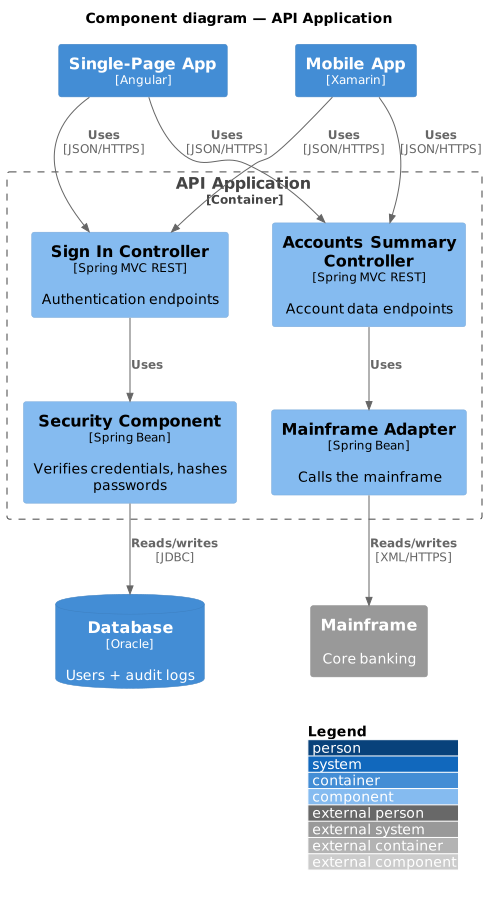
- Shows: the components inside one container, plus the boundary of that container and the immediate external collaborators (other containers, external systems).
- Hides: classes, functions, interfaces. Components are groupings, not individual types.
- Reader: developers working on that specific container.
- Size: 5–15 components. A container with 30 components should be split, or you've confused components with classes.
In practice, Level 3 is the most expensive level to maintain — it drifts fastest as code changes. Many teams draw Component diagrams lazily, only for containers where the internals are worth documenting (complex ones; newly-onboarding ones; where design decisions need a shared picture). That's fine.
Level 4 — Code
Zoom into one component. At this level, you're drawing classes, interfaces, or sequence diagrams — and at this level, you probably shouldn't draw by hand. Modern IDEs and reverse-engineering tools generate class diagrams and sequence diagrams from the code itself. Those stay in sync automatically; hand-drawn Level-4 diagrams don't, and go stale within a sprint.
C4 Level 4 is effectively "if you need it, use a generated UML class/sequence diagram for the component and link from the Component diagram to where that diagram lives". It's the one level the model leaves open-ended, which reflects reality — nobody agrees on the right granularity below components.
Supplementary Diagrams
The official C4 model ships two more diagram types that don't fit the strict four-level hierarchy but show up constantly in practice.
Deployment diagram
Like a Container diagram, but showing where each container runs — which server, which region, which cluster. Critical for anyone thinking about scaling, HA, or disaster recovery.
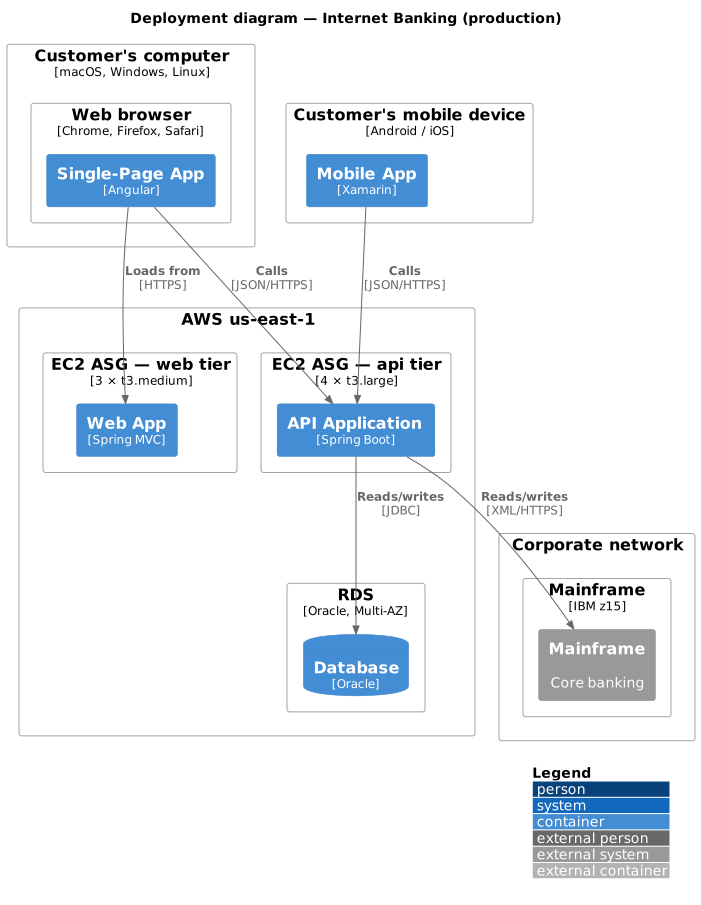
Deployment diagrams are essential when the architecture is interesting at the infrastructure level: multiple regions, specific SLAs, restricted network zones, data-residency requirements. If your whole system is "one monolith on one box", the deployment diagram is trivial and you can skip it.
Dynamic (runtime) diagram
A sequence-diagram-like view showing how a specific user-facing interaction flows through the containers or components at runtime. Useful for documenting key paths: "what happens when a customer clicks pay?", "how does a password reset work end-to-end?". Effectively a UML sequence diagram wearing C4 labels.
The C4 Notation
Four shapes and a handful of styling rules. That's the whole language.
- Person — a rounded rectangle with a stick-figure icon. Always a human user. Not a system.
- System / Software System — a rectangle, drawn with rounded corners in Level-1 style. The system being described; or an external system it depends on.
- Container — a rounded rectangle with a technology label underneath. Visible at Level 2 and below.
- Component — a rounded rectangle (inside a Container's dashed boundary). Visible at Level 3.
Beyond the four shapes:
- Arrows show relationships. Label every arrow with what flows ("Views orders", "Publishes events") and ideally the protocol in brackets ("[HTTPS]", "[JDBC]"). Unlabelled arrows are useless.
- Colours distinguish categories — your system (usually blue), external systems (grey), people (a third colour). Colour is a hint; the text labels do the real work.
- Boundaries (dashed rectangles around groups) mark what's "inside" your system vs "outside", or what belongs to one container at Level 3.
- Legends are mandatory in C4. If you use a colour or a line style for meaning, put a small legend box on the diagram.
Reading a C4 Diagram
A scan-pattern that works on any C4 diagram.
- Find the level. Context, Container, Component, or Deployment — usually labelled in the title. If not, count shapes: one system in the middle = Context; multiple containers = Container; components inside a dashed boundary = Component.
- Find your system. The box drawn in the primary colour. Everything grey is external.
- Read the arrows once. Each arrow answers "who talks to whom, and about what". Take a minute to read every label.
- Look for orphans. A box with no arrows is suspicious — either genuinely isolated, or the diagram is wrong.
- Check the legend. C4 diagrams should have one. If colours or line styles are unexplained, the diagram isn't finished.
Drawing Your Own — Four Passes
Start at Level 1 and work down. Don't try to produce all four levels in one sitting — you'll overfit the Context diagram to details you'll change in the Container diagram.
- Pass 1: Context. One box for your system. Around it, every human who uses it and every external system it touches. Label every arrow with the interaction. Stop when the picture is boring — that's a good sign at Level 1. If the Context diagram has 25 boxes, you're showing too much; split the system.
- Pass 2: Container. Expand the one box into its deployable parts. For each container, write: name, technology, one-line responsibility. Keep the external systems from Level 1 — they're still external. Label arrows with protocol (
HTTPS,JDBC,gRPC,Kafka). - Pass 3: Component. Pick the one or two containers worth expanding. Draw the internal components and their direct external collaborators. Skip trivial containers — nobody needs a Component diagram for a stateless proxy.
- Pass 4: Deployment. Overlay Level 2 onto infrastructure. Which cloud region, which VM type, how many replicas. This is where conversations about scaling and cost start.
A good rule: if you could delete a diagram and no one would notice, delete it. C4 is at its best when every level has a reader who actually opens it.
Common Beginner Mistakes
- Mixing levels. Databases on the Context diagram. Classes on the Component diagram. Keep each diagram at one zoom level; if you need to show two, draw two diagrams.
- Unlabelled arrows. "→" between two boxes with no text is noise. Every arrow gets a verb + (optionally) a protocol.
- Too many shapes on one page. If a Container diagram has 30 boxes, it's either documenting two systems or it's actually a Component diagram. Split.
- No technology choices on containers. The point of a Container diagram is showing what runs. A container labelled "Service" with no tech is a wasted box.
- Drawing all four levels for a trivial system. If your system is "an S3 bucket and a Lambda", you don't need four diagrams. A single Context diagram is enough.
C4 vs. Other Notations
How C4 compares to things you've probably seen:
- C4 vs. UML. UML has 14 diagram types and an institutional air; C4 has 4 and a pragmatic one. Most UML critiques ("who reads these?", "they go stale immediately", "nobody agrees on notation") don't land on C4 because C4 restricts itself to the levels that reliably get read and updated. Use UML class diagrams when you need the full detail of OO relationships; use C4 for the architecture.
- C4 vs. "boxes and lines". Ad-hoc diagrams on a whiteboard are fine for quick conversations. The moment someone saves one and starts sharing it as documentation, name the boxes "Container" / "Component" and draw the arrows properly — you're already doing C4 without knowing it.
- C4 vs. architecture decision records (ADRs). Different tools. ADRs document decisions ("we chose Postgres over Mongo because…"); C4 documents structure ("the system has these containers connected like this"). Mature teams use both.
C4 as Code
The C4-PlantUML library lets you write C4 diagrams in text and render them anywhere PlantUML renders. The four diagrams in this article are written in that syntax. A Container diagram example:
@startuml
!include https://raw.githubusercontent.com/plantuml-stdlib/C4-PlantUML/master/C4_Container.puml
LAYOUT_WITH_LEGEND()
title Container diagram — Internet Banking

Person(customer, "Banking Customer")
System_Boundary(c1, "Internet Banking System") {
    Container(web_app, "Web App", "Java, Spring MVC")
    Container(api, "API Application", "Java, Spring Boot")
    ContainerDb(db, "Database", "Oracle")
}
System_Ext(mainframe, "Mainframe")

Rel(customer, web_app, "Uses", "HTTPS")
Rel(api, db, "Reads/writes", "JDBC")
Rel(api, mainframe, "Calls", "XML/HTTPS")
@enduml
Dropping that into a project README or a GitHub wiki renders the diagram inline, versioned alongside the code it describes. When a container's technology changes, the diagram is updated in the same PR as the code — no separate diagram-maintenance ceremony, no drift.
Closing: Document the Architecture You Have
The best architecture diagram is the one that exists, stays up to date, and is actually read. C4 is popular because it hits all three: it's cheap to draw, easy to maintain, and pitched at the levels people want.
Start small. Draw the Context diagram for a system you work on right now. Spend thirty minutes. Share it with two colleagues and watch what they ask — those questions are the shape of Level 2. Next week, draw the Container diagram. Next month, draw the Component diagram for the one container where the internals are worth knowing. Don't draw the code level unless you genuinely need it.
A team with a current, readable Context + Container diagram beats a team with a Visio masterpiece from 2019 that still shows the monolith. Keep it simple; keep it current; keep it shared. That's C4.
More from the blog .



Ready to start collaborating ?
Join thousands of teams using CorriDraw for their visual collaboration needs.