
Kanban Boards 101: Make the Work Visible, Limit Work in Progress
A beginner's guide to Kanban. Learn the five ingredients (columns, cards, WIP limits, flow, explicit policies), how to read a board in ten seconds, the three common variations (swimlanes, expedite lane, classes of service), when to use Kanban vs. Scrum, and the five mistakes every first board makes. Walk through a complete team board in Mermaid.
Palakorn V.
Product Lead
What Is a Kanban Board?
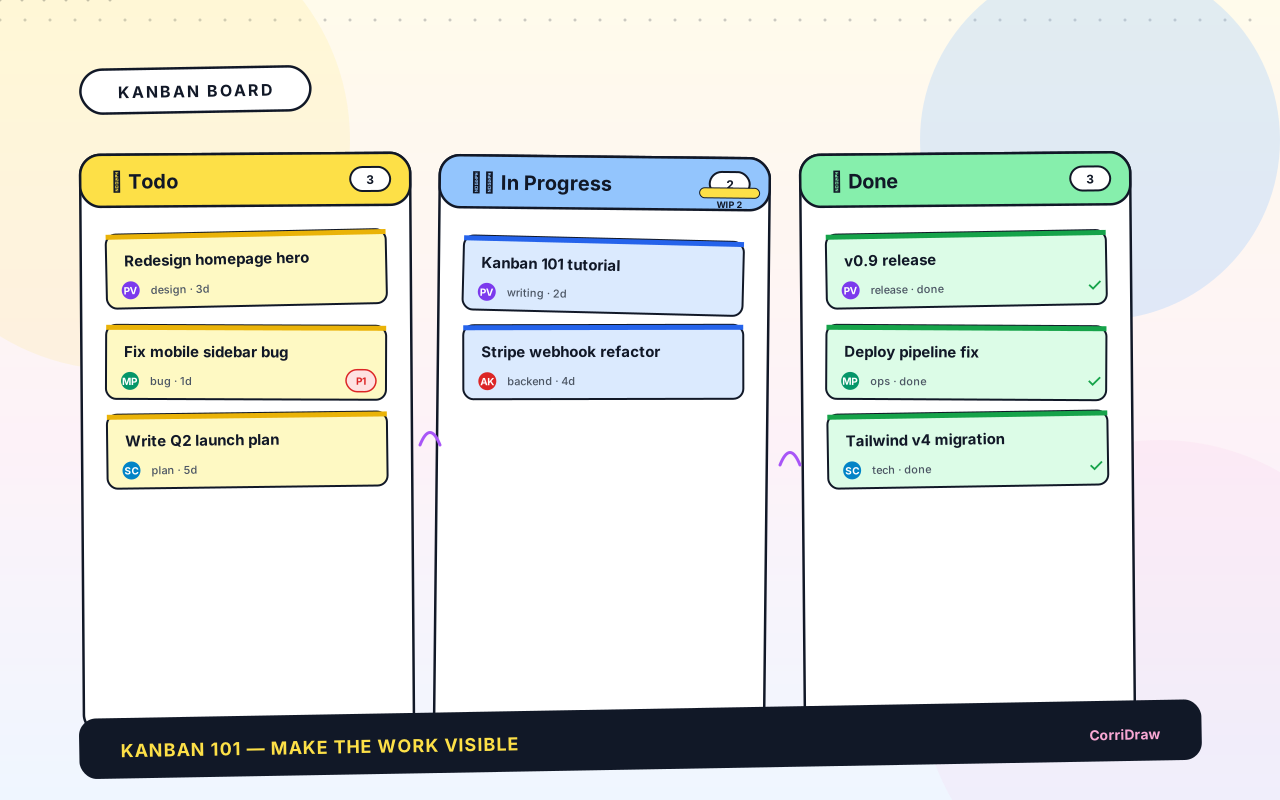
A Kanban board is a picture of work. You split the picture into columns — one column per stage a piece of work can be in — and you put every task on a card that moves across those columns as it progresses. At the end of the day anyone can look at the board and, without reading a word of status update, see: what's queued, what's being worked on, what's stuck, and what's done. That transparency is the whole point.
Here is the simplest possible board — three columns, a handful of cards:

The word kanban is Japanese for "signboard" or "billboard". The system was invented inside Toyota in the late 1940s to keep the manufacturing line from building up inventory of half-finished parts. A team would only build the next component when a downstream station asked for one, by passing back a kanban card. The idea travelled from factory floor to software team in the late 2000s, kept the name, and became the most-used work-visualization method of the last twenty years.
The modern software Kanban board keeps the same spirit: make the work visible, limit work in progress, and let the columns pull work through. This post teaches you to read and draw one, the rules that separate a useful board from a dashboard nobody checks, and the three variations you will encounter in real teams.
Why Kanban Works
Three properties make Kanban hard to beat for day-to-day team work.
First: the board is the status report. No standup slide deck, no weekly email, no "quick sync about the quarter". Anyone who wants to know what the team is doing opens the board and reads. A manager who walks past sees instantly whether the team is spread thin (lots of cards in In Progress) or blocked (cards piling up at one column's edge). The board is the conversation — everything else is footnotes.
Second: it surfaces bottlenecks. Watch any Kanban board for a week and the column that's always full becomes obvious. Cards stack up there because some downstream constraint isn't keeping up — maybe QA has one person, maybe design reviews take three days, maybe deploys require approval from someone on vacation. The board doesn't solve the bottleneck, but it makes the bottleneck impossible to ignore. That alone is often enough to fix it.
Third: it gives permission to say no. If the team has a rule "no more than three cards In Progress", and there are already three cards In Progress, starting a fourth is visibly wrong. Anyone can say "we can't take this on right now, look at the board" and everyone understands why. Without that rule you end up with eleven things started and three things finished — the classic anti-pattern of an overcommitted team.
The Anatomy of a Kanban Board
Five ingredients make a Kanban board. Any board you encounter, however elaborate, is just these five concepts in combination.
Columns (stages)
Each column represents a stage of work. The minimum is three: "Todo", "In Progress", "Done". Most real teams add at least one: "In Review", "Blocked", "Deployed", or similar. The columns should match the team's actual workflow — don't invent stages that don't exist in practice, and don't merge stages that do exist just to simplify the board. If your work really goes through design review before engineering, add a "Design Review" column.
Cards (tasks)
Each card is one piece of work. The golden rule: a card should be something you can move from one column to the next in a single action. If a card is "Redo the whole onboarding flow", that's a project, not a card — break it up. If a card is "Rename a variable", that's too small — most teams fold tiny tasks into the PR of a larger card. A good working size is "half a day to three days" — a chunk of work one person can own, finish, and demo.
A card typically shows: the title, the owner (avatar or initials), and sometimes a priority marker, a due date, or an estimate. Keep the card small: if it needs a paragraph of explanation to understand, that explanation goes in a linked ticket, not on the board.
WIP limits
A Work-In-Progress limit is a number written at the top of a column: "no more than 2 cards here at any time". This is the rule that distinguishes Kanban from a simple to-do list. Without WIP limits, teams naturally accumulate dozens of half-started cards and finish nothing; with WIP limits, starting a new card requires finishing (or explicitly parking) an existing one.

WIP limits feel strict the first time. They are strict on purpose — they force the team to pull, not push. A common starting rule is (team size) × 1.5, rounded down as the total across all In-Progress columns: four people, six cards in flight, not more. If the team is hitting the limit constantly, that's information: either the team is overcommitted, or the downstream stage (review, QA, deploy) needs attention.
Flow (left to right)
Cards always move left to right. A card doesn't skip a stage — even if there's nothing to review on a trivial change, the card still spends a few seconds in "In Review" while someone clicks approve. Skipping stages erodes the board's ability to show bottlenecks.
A card can move right-to-left, but only under specific circumstances: rejected in review, blocked, or being reopened. When that happens, mark it clearly (most teams flag the card with a colour or a 🚫 emoji). A card that keeps bouncing between "In Progress" and "In Review" is telling you the work isn't done yet; that's a useful signal.
Explicit policies
A good Kanban board has one line of text at the top of each column that describes what "done" means for that stage. Not the work itself — the exit criteria.
- In Progress → In Review: "code compiles, tests pass locally, PR opened".
- In Review → Done: "at least one approval, CI green, deployed to staging".
Without explicit policies, different team members interpret "done" differently and cards move forward prematurely. Writing the policy on the board in plain language removes the argument before it starts.
Reading a Kanban Board in Ten Seconds
Once the anatomy clicks, reading a board becomes a glance. Here's a scan-pattern that works on almost any board.
- Look at column heights. If one column is way taller than the others, that's the bottleneck. Work is arriving faster than it can exit.
- Look at card age. A card that's been In Progress for eight days while others move in two is stuck. Most Kanban tools tint old cards; on a physical board, a small dot drawn each morning works just as well.
- Look for red. Most teams use red to mark blocked cards. If there's red, don't start a new card — help unblock the red one first.
- Check WIP limits. Any column over its limit, or at its limit and growing, needs attention.
- Ignore Done for now. Done is the trophy case. It's nice at the end of the week; it's not the lens for "what should I do next".
Three Variations You'll Meet
Most teams customize the vanilla board. Three patterns show up over and over.
Swimlanes
A swimlane is a horizontal band across the board, cutting the columns into rows. Each row groups cards by a category: by priority (high / medium / low), by team (backend / frontend / design), by customer (Acme / Widgets Inc / internal), or by project. Swimlanes let two groups share one board without their cards getting tangled.

Use swimlanes when you have a natural category with 3–5 values, and when cards don't regularly jump between categories. Don't use swimlanes to slice one team's work by person — that pushes people into queues and undermines pull.
An "Expedite" lane
Some teams add a thin lane across the top of the board labelled Expedite for genuine emergencies: production outages, security issues, a customer on fire. Rules: at most one card at a time, WIP limits in every other lane are ignored until the expedite card clears, and a postmortem gets written afterwards. Most weeks this lane is empty. When it's full, the team swarms.
Classes of service
A more formal version of expedite. Cards are tagged with a class of service — "Standard", "Fixed Date" (must ship by a specific date), "Expedite" (right now), "Intangible" (tech debt, research) — and each class has its own WIP limit and priority rule. Classes of service help teams that have to juggle promises to multiple audiences (customers, legal, internal tooling) without dropping any on the floor.
Kanban vs. Scrum (and Why It Matters)
Scrum and Kanban are often confused because they both show work on a board. The difference is time.
Scrum is time-boxed. Work is planned into sprints (usually two weeks). At the start of a sprint the team picks a batch of cards; at the end of the sprint the batch is reviewed together; mid-sprint changes are discouraged. The board resets every two weeks.
Kanban is continuous. There's no sprint. Cards enter the Todo column whenever they're ready; they move through the stages whenever capacity is available; they exit Done whenever they finish. The board never resets.
Kanban wins when work is unpredictable (support, operations, small features shipped as they're ready). Scrum wins when work benefits from batching — when the team can benefit from planning and demo ceremonies tied to a fixed cadence. Most teams end up somewhere in between: "Scrumban", a Kanban board with a light planning ritual every couple of weeks.
Common Beginner Mistakes
Five mistakes show up in almost every first Kanban board.
- Too many columns. Seven-column boards look thorough and read like a maze. Start with three or four; add a column only when a bottleneck reveals itself. You can always split "In Progress" into "Dev" and "Review" later.
- No WIP limits. A Kanban board without WIP limits is just a to-do list with fancy columns. The limits are the engine that makes the system work.
- Cards that are too big. If a card has been In Progress for two weeks, it's not a card, it's a project. Break it down; put the sub-tasks on separate cards.
- A "blocked" card with no owner. Every card should have someone accountable, especially when it's stuck. A blocked card in no-one's name becomes invisible.
- Done column that grows forever. Archive finished cards every week or two. A Done column with three months of history doesn't give the satisfaction of completion — it just fills space and slows the board down.
Drawing Your Own
Five steps to draw a Kanban board for your team from scratch.
- List your stages. Write down every distinct step a piece of work goes through, from "someone thought of it" to "it's live in production". Merge stages that always happen together (e.g. "run tests" + "deploy to staging"). You should end up with four to six stages.
- Draw the columns. One column per stage, left to right in the order work flows.
- Pick WIP limits. A simple rule: for each in-progress stage, limit = (team size ÷ number of in-progress stages), rounded up. For a team of four with three in-progress stages, that's two cards per stage. Adjust up or down based on experience.
- Write the exit policy under each column header. One line: "this card can leave this column when X".
- Put the first ten cards on it. Don't plan the rest of the quarter — just the next ten things. The board learns its real shape from use.
Review the board together after a week. The wrong columns become obvious; the wrong WIP limits are the first thing people complain about. Adjust and continue. A Kanban board is a living artifact, not a one-time setup.
Expressing Kanban as Text
Mermaid (v11.6+) has a native kanban syntax that renders a full board from a few lines of text. The same board you saw at the top of this article, in Mermaid:
kanban
  Todo
    [Sketch landing hero]
    [Wire up Stripe webhooks]
    [Fix sidebar ESC hotkey]
  In Progress
    [Write the kanban 101 post]
    [Refactor avatar upload]
  Done
    [Ship dark mode]
    [Deprecate old API]
Mermaid is understood by GitHub, GitLab, Notion, and most developer documentation tools. Dropping a kanban block into a project README gives you a board that renders wherever the README does, no tool required.
Closing: A Board Is a Conversation
The best Kanban board on your team is the one people actually look at. Fancy dashboards, automation, elaborate colour schemes — none of those matter if the board is stale. A cardboard-and-sticky-notes board updated daily beats a Jira instance that's ignored.
Start simple: three columns, a handful of cards, a WIP limit. Let the team complain about what's missing — those complaints are the real design requirements. After a month you'll have a board that looks like your team's workflow, not a template from a textbook. That's when Kanban works.
Everything in this article transfers: pen and paper, a whiteboard, Trello, Jira, Linear, Notion, GitHub Projects. The notation is the same; only the tool changes. If you'd like a tool that has kanban as a native diagram type with a Mermaid importer — so you can sketch the board in a meeting and keep it evolving afterwards — CorriDraw is one option; it's the tool you're reading this on. But the ideas come first.
More from the blog .


Ready to start collaborating ?
Join thousands of teams using CorriDraw for their visual collaboration needs.