
Offline & merge
How CorriDraw behaves when your connection drops, how queued edits ride out the gap, and how concurrent changes are merged when everyone reconnects.
CorriDraw is designed to keep working when the network doesn't. The editor is a Progressive Web App: once you've opened it, the shell, the toolbar, the icons, and your most recent scene are cached locally, so a flaky train Wi-Fi or a coffee-shop hotspot dropout doesn't lose you. Edits you make while offline are kept in memory and on disk, and when the connection comes back, CorriDraw merges them with whatever your teammates did in the meantime.
What "offline" actually means
The editor watches the browser's online and offline events and the
state of its WebSocket to the collaboration server. There are three failure modes you'll see:
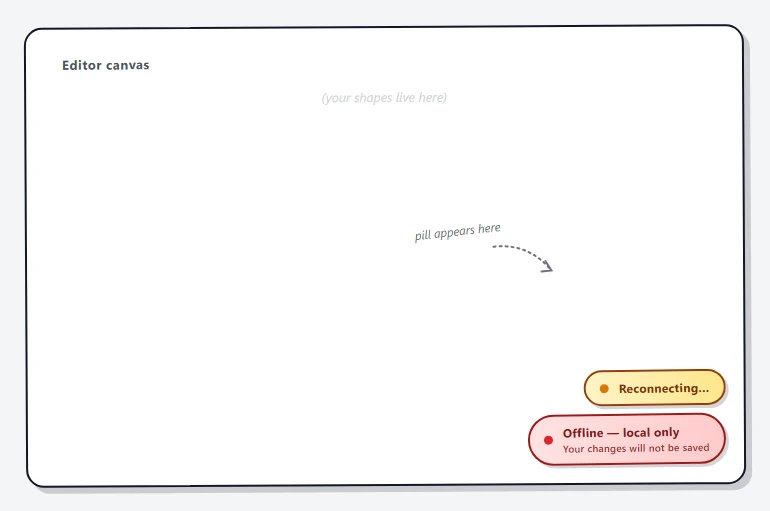
- Browser says offline — your laptop lost Wi-Fi, mobile data dropped, etc.
navigator.onLineflips tofalse. CorriDraw shows a red Offline — local only pill in the bottom-right with the warning Your changes will not be saved. Your edits keep working; they're queued in local storage and ride out the gap. - Browser says online but the collab socket is dead — Wi-Fi works, but corporate firewall, captive portal, or our server is having a bad day. The pill switches to an amber Reconnecting… with a pulsing dot. CorriDraw retries with exponential backoff and the pill disappears the moment the socket reopens. This indicator only appears during a live collab session — solo editing has no socket to reconnect.
- Save backend is unreachable — you can still draw and (if the collab socket is up) live-collaborate, but persistent saves are queueing. There's no dedicated pill for this state today; surfacing it as a third pill is on the roadmap. In the meantime, watch the canvas for the standard Couldn't save. Retrying… alert that the editor renders inline.
What the PWA caches
CorriDraw's service worker (/sw.js) precaches the static shell on first install:
icons, the manifest, and the favicons. The editor's compiled JavaScript is requested with a
cache-first strategy on second load, so cold-launching the app from a home-screen icon while
offline still gets you a working editor. Your most recent scene is held in
localStorage (and IndexedDB for embedded image blobs), so reopening a diagram
you've recently visited works even with no network.
The PWA does not cache other people's diagrams or your dashboard listing — those are fetched from the API and require connectivity. If you specifically want a diagram available offline on a device, open it once on that device while online; the next time you open it, even offline, you'll get the version you last had.
Editing while offline
Drawing while offline feels exactly like drawing while online, with two differences:
- Live cursors and other people's edits stop coming in. The avatar row in the top-right shows only you (or empties out completely once their old cursors time out).
- Your saves are queued, not committed. Every change is still recorded to local storage immediately, so a tab refresh won't lose work — but the cloud copy of the diagram is frozen at the last successful save.
The toolbar, undo/redo, every drawing tool, theme switcher, and zoom controls all keep working. Mermaid and PlantUML imports also keep working — they're parsed locally. The two things that genuinely require a network are AI features (which call out to a model server) and image uploads to the embedded files store; both will fail with a clear error and let you try again later.
How merge actually works
CorriDraw is not a strict CRDT in the academic sense — it's a simpler scheme that gets you most of the same outcomes for diagrams. Each element on the canvas carries two integers:
version— increments by 1 every time the element is mutated.versionNonce— a random integer regenerated alongsideversion.
When a remote update arrives, CorriDraw compares it element-by-element with what you have:
- If you don't have the element at all, take the remote one.
- If your
versionis higher, keep yours and discard theirs. - If their
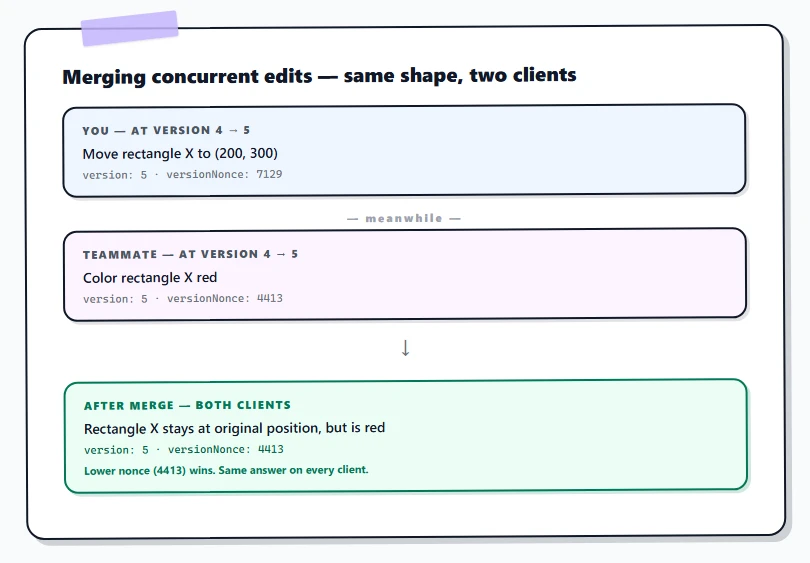
versionis higher, take theirs. - If versions tie, the lower
versionNoncewins. Both clients arrive at the same answer because they're comparing the same two random numbers. - If you're actively editing an element (resizing, dragging, typing into a text element), incoming remote changes for that element are ignored until you finish — your in-progress action is never clobbered mid-stroke.
For ordering — which shape is in front of which — elements use fractional indices, so two clients that simultaneously add a new shape mid-stack will both end up with a valid ordering after merge, with no jitter or re-sort flickering.
Reconnect
When the socket reopens, your client emits its full local scene to the room. The server relays it (still encrypted; the server cannot read element data) and every other connected client merges your scene against theirs using the rules above. The same merge runs in the other direction so your view ends up with their changes too. Within a beat or two, every tab converges to an identical scene.
For diagrams that are not in a live session — e.g. you and a teammate both edited the same diagram offline, hours apart — convergence happens via the save-and-load path instead. Each client writes their snapshot to the backend on reconnect; the latest successful write wins at the document level, but version-history snapshots preserve the earlier ones so nothing is genuinely lost. If two writes race, the loser is preserved as a version-history entry tagged with the time and author, and you can restore from it through the version-history panel. See Save & version history for the recovery flow.
Conflict edge cases
- Same shape, both moved offline. The merge picks one position deterministically (higher version, then lower nonce). The other move is in the loser's undo history — they can click Undo in the toolbar (or press
Cmd/Ctrl+Z) to retry their move. - Shape deleted by one, edited by another. Deletion is a state change, not a tombstone-free remove — the shape gets
isDeleted: truewith a bumped version. Whoever has the higher version wins; if the editor's edit happened after the delete, the shape comes back. - Long offline session. If your local edits diverge significantly (you reorganized the whole canvas while offline for a day), reconnection still works, but a heads-up prompt warns you that "stopping the session will overwrite your previous, locally stored drawing" — read it carefully and consider exporting a
.corridrawbackup (Main menu → Save to…) before confirming.
The whole merge runs on every client, which means you don't need a connection back to the server to resolve conflicts between two reconnected peers — they'll converge against each other directly through the encrypted broadcast, with the server doing nothing more than forwarding bytes.