Roles & permissions
How VIEWER, EDITOR, and OWNER roles work on individual diagrams, how they relate to workspace-level roles, and which actions each role can perform.
CorriDraw has two parallel sets of roles. Diagram-level roles control who can look at or edit a single drawing. Workspace-level roles control who can administer a whole workspace — its members, its folders, and the diagrams it contains. Most questions about "can this person do X?" come down to the diagram role; the workspace role only matters once you have shared folders or you're inviting people into a paid team workspace.
Diagram roles
Every diagram has exactly one OWNER — the person who created it (or the person you transferred it to). The owner can do anything. Beyond the owner, individual users and public links each carry a single role:
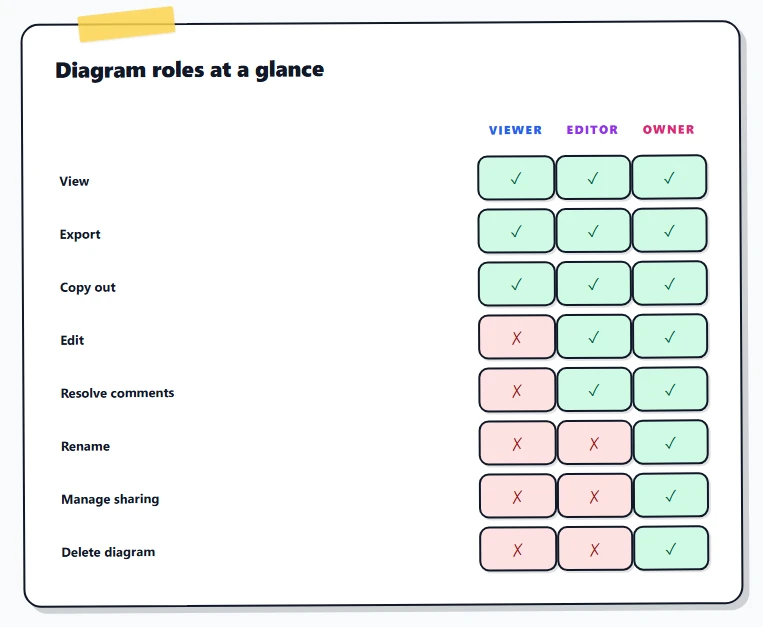
- VIEWER — read-only on the canvas. Pan, zoom, switch themes, export to PNG/SVG/JSON, copy elements onto their own scratch canvas, and read or post comments and replies on existing threads. Cannot draw, move, delete, rename, or change settings on this diagram, and cannot delete or edit other people's comments.
- EDITOR — full canvas write access. Add, modify, delete, and re-arrange any element. Save snapshots into version history. Add, resolve, and edit their own comments. Cannot delete the diagram itself, change its title, transfer ownership, manage who else has access, or create or revoke its public link.
- OWNER — everything an editor can do, plus rename the diagram, move it between folders, change sharing, manage invitations, regenerate or disable the public link, restore from version history, resolve or delete any comment regardless of author, and permanently delete the diagram.
Per-person invites vs. public links
Both kinds of share carry a role. To open either, click the Share button at the top right of the editor:
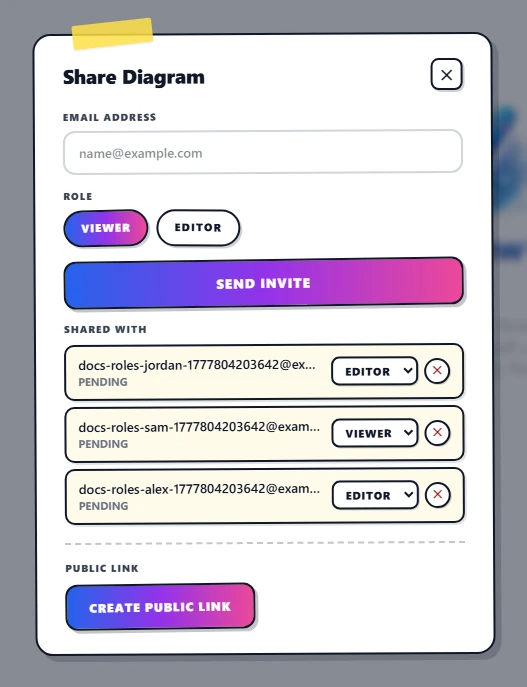
- Per-person invite (Share dialog → Email field). Click into the Email field, type an address, click Viewer or Editor, click Send invite. The recipient gets an email and, after they sign in, the diagram appears under Shared with me. They keep that role until you change it or remove them. Invites are tied to the email account — a stranger who somehow gets the invite link cannot accept it from a different account.
- Public link (Share dialog → Public Link panel). One token, one role for everyone. Anyone with the URL gets the role attached to that link. Click the link from Viewer to Editor pill and every existing copy of the URL is now an editor; click it back and they're all viewers again. There is no way to give different visitors different roles on the same public link — if you need that, send per-person invites instead.
Escalation rules
What happens when the same person has access from two routes? CorriDraw always uses the highest role they hold on that diagram:
- You're invited as a VIEWER and someone hands you the EDITOR public link → you're an editor for the duration of that session.
- You're an EDITOR via personal invite and the link is set to VIEWER → you're still an editor (your personal grant wins).
- You're the OWNER → you ignore link roles entirely; you're always the owner.
- You're a workspace ADMIN looking at someone else's diagram inside that workspace → you do not automatically get edit access on the diagram. Ownership of a diagram is independent of the workspace it lives in.
Workspace roles
Workspaces (collections of folders and diagrams shared by a team) have their own role hierarchy:
- VIEWER — can browse the workspace's folders and open diagrams that have been explicitly shared with them, but cannot create new diagrams in it.
- MEMBER — the default for someone who joins a paid workspace. Can create diagrams in shared folders, edit their own, and see the workspace member list.
- ADMIN — can invite and remove members, create and delete folders, and change other members' workspace roles (except other admins or the owner).
- OWNER — exactly one per workspace. Owns billing, can promote and demote admins, and is the only role that can delete the workspace.
The hierarchy is strict: anything a VIEWER can do, a MEMBER can do; anything a MEMBER can do,
an ADMIN can do; anything an ADMIN can do, the OWNER can do. This is what
hasRoleLevel("MEMBER") checks for in the API — "is this user at least a member?"
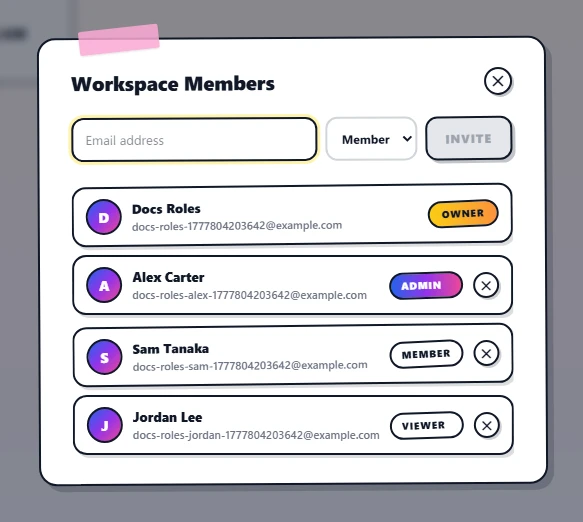
Diagram role vs. workspace role
These two systems are deliberately independent. A workspace MEMBER who creates a diagram in a shared folder is its OWNER (diagram-level), even though they're only a MEMBER of the workspace. A workspace ADMIN can manage the team but cannot silently take over a teammate's diagram — they have to ask the diagram's owner to share it, or, if the owner has left the company and ownership transfer is needed, ask a workspace OWNER to reassign it.
The single exception: when a workspace OWNER deletes a workspace member, that member's personally-owned diagrams in shared folders are reassigned to the workspace OWNER so the diagrams don't become orphaned. Diagrams in the user's personal workspace stay with them on their personal account.
Changing someone's role
Open the Share dialog (top-right Share button) and find the person in the Shared with list below the invite form. Each row carries a role select on the right — flip it from Viewer to Editor (or back) and the change saves immediately, no re-invite required. To revoke access entirely, click the small × button to the right of the role select. The user loses access on their next request — links they have open will start failing the next time the page hits the API. The Shared with list is the source of truth for who has access and what role they hold; each row shows the email, their invite status (Pending until they accept, then Active), the role select, and the remove button.